> ## Documentation Index
> Fetch the complete documentation index at: https://docs.omex.pro/llms.txt
> Use this file to discover all available pages before exploring further.
# Logging
> Log events in your server.
## Overview
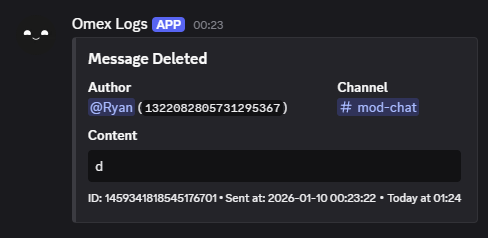
Logging lets you send server event logs to one or more channels. This is useful for moderation, auditing, and keeping track of activity.
## Available logging events
Available logging events are `messages`, `member`, `roles`, `channels`, `invites`, `emojis`, and `voice`.
Do not delete the webhook that Omex creates in your logging channels — logs are delivered through it.
You can configure up to **3** log channels per server, and each channel can be set to **one** event type (or `all`).
***
## View current logging setup
Use this to see what logging channel(s) and events are currently configured.
```javascript Syntax theme={null}
,logs
```
***
## Adding a logging event
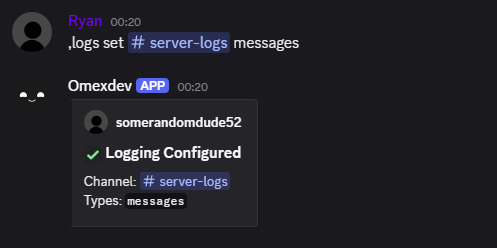
You can enable logging in a channel using the `logs set` command.
```javascript Syntax theme={null}
,logs set (channel) (event | all)
```
```javascript Example theme={null}
,logs set #logs messages
,logs set #member-logs member
,logs set #everything all
```
 ***
## Removing a logging event
You can remove logging using the `logs remove` command.
```javascript Syntax theme={null}
,logs remove (event | all)
```
```javascript Example theme={null}
,logs remove messages
,logs remove all
```
***
## Removing a logging event
You can remove logging using the `logs remove` command.
```javascript Syntax theme={null}
,logs remove (event | all)
```
```javascript Example theme={null}
,logs remove messages
,logs remove all
```
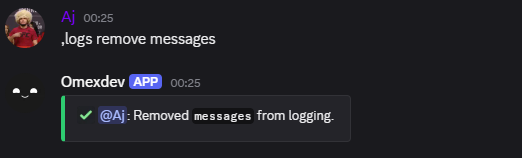 If you leave the event parameter empty (or use `all`), logging will be fully disabled for the server.
***
## Ignoring a member or channel
You can ignore a user or channel so their activity won’t be logged.
```javascript Syntax theme={null}
,logs ignore (member | channel | voice channel)
```
```javascript Example theme={null}
,logs ignore @Aj
,logs ignore #staff-chat
```
***
## Unignoring a member or channel
Remove a user/channel from the ignore list so they will be logged again.
```javascript Syntax theme={null}
,logs unignore (member | channel | voice channel)
```
```javascript Example theme={null}
,logs unignore @Aj
,logs unignore #staff-chat
```
***
## Viewing ignored targets
Use the `logs ignored` command to view all ignored members and channels.
```javascript Syntax theme={null}
,logs ignored
```
If you leave the event parameter empty (or use `all`), logging will be fully disabled for the server.
***
## Ignoring a member or channel
You can ignore a user or channel so their activity won’t be logged.
```javascript Syntax theme={null}
,logs ignore (member | channel | voice channel)
```
```javascript Example theme={null}
,logs ignore @Aj
,logs ignore #staff-chat
```
***
## Unignoring a member or channel
Remove a user/channel from the ignore list so they will be logged again.
```javascript Syntax theme={null}
,logs unignore (member | channel | voice channel)
```
```javascript Example theme={null}
,logs unignore @Aj
,logs unignore #staff-chat
```
***
## Viewing ignored targets
Use the `logs ignored` command to view all ignored members and channels.
```javascript Syntax theme={null}
,logs ignored
```