> ## Documentation Index
> Fetch the complete documentation index at: https://docs.omex.pro/llms.txt
> Use this file to discover all available pages before exploring further.
# Antinuke
> Impose restrictions on moderators to prevent destructive behavior.
## Why use an antinuke system?
An antinuke system helps protect your server from destructive actions performed by moderators/staff — whether intentionally, accidentally, or through a compromised account. It limits how many high‑impact actions someone can do within a short time window and automatically responds when that limit is exceeded.
## How does **this** antinuke work?
This system is **event + audit‑log + rate‑limit** based.
1. **A server event happens** (e.g. channel created, role deleted, member banned).
2. The bot reads the **Audit Log** to determine **who** performed the action.
3. The bot checks if the actor is **bypassed** (server owner / whitelisted).
4. A **rate limiter** counts how many actions that actor performs within **10 seconds**.
5. If the actor exceeds the configured **threshold**, AntiNuke:
* **Logs** an alert to your configured log channel (if enabled)
* **Punishes** the actor (`ban`, `kick`, or `stripstaff`)
* **Reverts** what it can (e.g. deletes newly‑created channels/roles, reverts permission escalation, removes dangerous roles, deletes mention spam)
### What it can and cannot revert
**Can revert:**
* Channel creation (deletes the created channel after trigger)
* Role creation (deletes the created role after trigger)
* Dangerous permission escalation on roles (reverts permissions back)
* Dangerous roles granted to members (removes the dangerous roles)
* Mention spam (deletes cached mention messages from the last 10 seconds)
* Webhook abuse (deletes abusive webhooks if it has permission)
* Bot adds (kicks unauthorized bots when triggered)
**Cannot reliably revert:**
* Channel deletions (Discord does not provide a true restore)
* Role deletions (same limitation)
AntiNuke will still **punish and log** the actor for deletions.
***
## Requirements
### Bot permissions (important)
AntiNuke relies heavily on audit logs and moderation permissions. Recommended permissions:
* **View Audit Log** *(required for most modules to function)*
* **Ban Members** *(if you use ban punishment)*
* **Kick Members** *(if you use kick punishment)*
* **Manage Roles** *(required for stripstaff + reverting perms + removing dangerous roles)*
* **Manage Channels** *(required to delete channels it created / clean up)*
* **Manage Webhooks** *(required to remove abusive webhooks)*
* **Read Message History** *(for mention spam deletion)*
* **Manage Messages** *(helps with deleting mention messages)*
> If your bot does not have a required permission, that module may silently fail to punish/revert.
***
## Quick setup
1. Invite the bot with the permissions above.
2. Enable Antinuke: `.antinuke on`
3. Set a log channel: `.antinuke logchannel #logs`
4. Add trusted Antinuke admins (optional): `.antinuke admin @user`
5. Configure modules (recommended set below).
6. Verify config: `.antinuke configuration`
***
## Core commands
### Enable AntiNuke (server owner only)
```javascript Syntax theme={null}
.antinuke on
```
```javascript Example theme={null}
.antinuke on
```
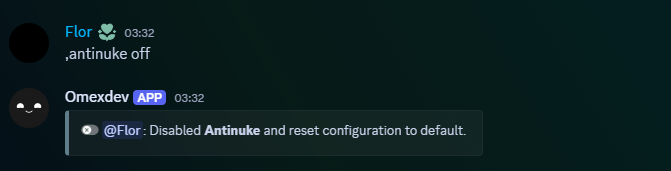
 ### Disable AntiNuke (server owner only)
This disables AntiNuke and resets the stored configuration.
```javascript Syntax theme={null}
.antinuke off
```
```javascript Example theme={null}
.antinuke off
```
### Disable AntiNuke (server owner only)
This disables AntiNuke and resets the stored configuration.
```javascript Syntax theme={null}
.antinuke off
```
```javascript Example theme={null}
.antinuke off
```
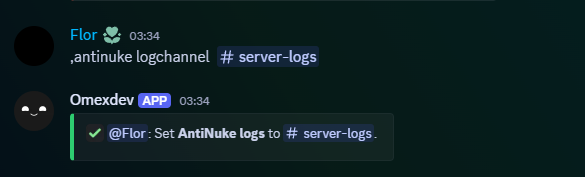
 ### Set the log channel (server owner only)
```javascript Syntax theme={null}
.antinuke logchannel (#channel)
```
```javascript Example theme={null}
.antinuke logchannel #security-logs
```
#### Disable logging
```javascript Syntax theme={null}
.antinuke logchannel
```
```javascript Example theme={null}
.antinuke logchannel
```
### Set the log channel (server owner only)
```javascript Syntax theme={null}
.antinuke logchannel (#channel)
```
```javascript Example theme={null}
.antinuke logchannel #security-logs
```
#### Disable logging
```javascript Syntax theme={null}
.antinuke logchannel
```
```javascript Example theme={null}
.antinuke logchannel
```
 ***
## Admins and bypassing
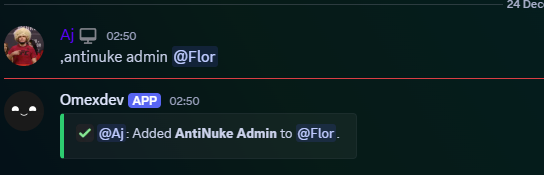
### Allowing other users to configure AntiNuke (server owner only)
The server owner can toggle AntiNuke Admin on a member.
This is dangerous. AntiNuke Admins can alter protections and reduce thresholds.
```javascript Syntax theme={null}
.antinuke admin (user)
```
```javascript Example theme={null}
.antinuke admin @aj.wtf
```
***
## Admins and bypassing
### Allowing other users to configure AntiNuke (server owner only)
The server owner can toggle AntiNuke Admin on a member.
This is dangerous. AntiNuke Admins can alter protections and reduce thresholds.
```javascript Syntax theme={null}
.antinuke admin (user)
```
```javascript Example theme={null}
.antinuke admin @aj.wtf
```
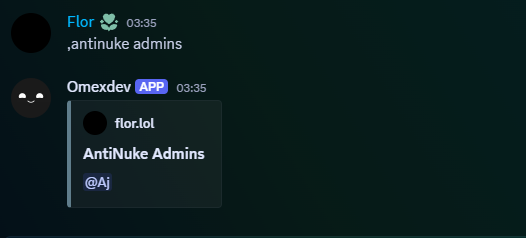
 ### Viewing AntiNuke Admins (server owner only)
```javascript Syntax theme={null}
.antinuke admins
```
```javascript Example theme={null}
.antinuke admins
```
### Viewing AntiNuke Admins (server owner only)
```javascript Syntax theme={null}
.antinuke admins
```
```javascript Example theme={null}
.antinuke admins
```
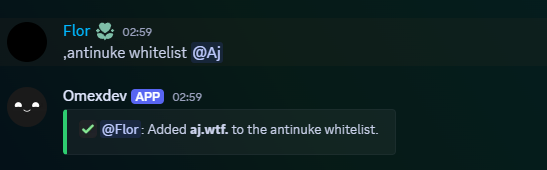
 ### Whitelisting (bypass AntiNuke)
Whitelisted users do not trigger antinuke punishments.
Dangerous: this bypasses ALL modules.
```javascript Syntax theme={null}
.antinuke whitelist (user)
```
```javascript Example theme={null}
.antinuke whitelist @Aj
```
### Whitelisting (bypass AntiNuke)
Whitelisted users do not trigger antinuke punishments.
Dangerous: this bypasses ALL modules.
```javascript Syntax theme={null}
.antinuke whitelist (user)
```
```javascript Example theme={null}
.antinuke whitelist @Aj
```
 #### Unwhitelist
```javascript Syntax theme={null}
.antinuke unwhitelist (user)
```
```javascript Example theme={null}
.antinuke unwhitelist @Aj
```
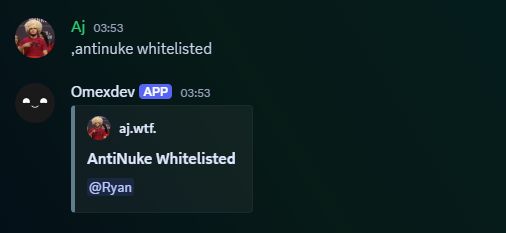
#### View whitelisted users
```javascript Syntax theme={null}
.antinuke whitelisted
```
```javascript Example theme={null}
.antinuke whitelisted
```
#### Unwhitelist
```javascript Syntax theme={null}
.antinuke unwhitelist (user)
```
```javascript Example theme={null}
.antinuke unwhitelist @Aj
```
#### View whitelisted users
```javascript Syntax theme={null}
.antinuke whitelisted
```
```javascript Example theme={null}
.antinuke whitelisted
```
 ***
## Enabling an antinuke module
Modules are configured per feature (ban/kick/channelcreation/etc). Each module is stored with:
* `status` (on/off)
* `punishment` (`ban`, `kick`, `stripstaff`)
* `threshold` (1–12)
* `command` (true/false) *(stored; triggers are event/audit-log based)*
### Available Flags
Number of actions allowed in a **10 second** window before AntiNuke triggers.
Recommended:
* **1–2** for destructive actions (deletions, dangerous permissions)
* **2–4** for creation spam (channels/roles)
* **3–5** for mentions
```javascript Syntax theme={null}
--threshold (number)
```
```javascript Example theme={null}
--threshold 3
```
Action taken against the actor when the module triggers.
Punishments:
* `ban`
* `kick`
* `stripstaff` (removes staff roles the bot is allowed to remove)
```javascript Syntax theme={null}
--do (punishment)
```
```javascript Example theme={null}
--do stripstaff
```
Stored in configuration as `command: true/false`.
Triggers rely on server events + audit logs, not command parsing.
Keep this enabled for consistency with your config schema.
```javascript Syntax theme={null}
--command (true | false)
```
```javascript Example theme={null}
--command true
```
***
## Modules (exactly matching your bot)
Triggers when bans are detected and attributes the action using audit logs.
```javascript Syntax theme={null}
.antinuke ban (on or off) --threshold (number) --do (punishment) --command (true | false)
```
```javascript Example theme={null}
.antinuke ban on --threshold 3 --do ban --command true
```
Triggers when kicks are detected and attributes the action using audit logs.
```javascript Syntax theme={null}
.antinuke kick (on or off) --threshold (number) --do (punishment) --command (true | false)
```
```javascript Example theme={null}
.antinuke kick on --threshold 3 --do kick --command true
```
If triggered, it punishes the actor and deletes the created channel.
```javascript Syntax theme={null}
.antinuke channelcreation (on or off) --threshold (number) --do (punishment)
```
```javascript Example theme={null}
.antinuke channelcreation on --threshold 2 --do stripstaff
```
Punishes/logs on threshold.
Deleted channels cannot be automatically restored.
```javascript Syntax theme={null}
.antinuke channeldeletion (on or off) --threshold (number) --do (punishment)
```
```javascript Example theme={null}
.antinuke channeldeletion on --threshold 1 --do ban
```
Watches channel edits (name/permissions/settings) and punishes if abused.
```javascript Syntax theme={null}
.antinuke channelupdate (on or off) --threshold (number) --do (punishment)
```
```javascript Example theme={null}
.antinuke channelupdate on --threshold 2 --do stripstaff
```
If triggered, it punishes the actor and deletes the created role.
```javascript Syntax theme={null}
.antinuke rolecreation (on or off) --threshold (number) --do (punishment)
```
```javascript Example theme={null}
.antinuke rolecreation on --threshold 2 --do stripstaff
```
Punishes/logs on threshold.
Deleted roles cannot be automatically restored.
```javascript Syntax theme={null}
.antinuke roledeletion (on or off) --threshold (number) --do (punishment)
```
```javascript Example theme={null}
.antinuke roledeletion on --threshold 1 --do ban
```
Watches role edits (name/permissions/settings) and punishes if abused.
If dangerous permissions were added, it can revert the role permissions back.
```javascript Syntax theme={null}
.antinuke roleupdate (on or off) --threshold (number) --do (punishment)
```
```javascript Example theme={null}
.antinuke roleupdate on --threshold 1 --do ban
```
Looks for webhook create/delete/update in audit logs.
If triggered and the bot has **Manage Webhooks**, it deletes webhooks in that channel.
```javascript Syntax theme={null}
.antinuke webhooks (on or off) --threshold (number) --do (punishment)
```
```javascript Example theme={null}
.antinuke webhooks on --threshold 1 --do ban
```
Counts mentions per message:
* `@everyone/@here` adds **5**
* user mentions add **1 each**
* role mentions add **1 each**
When triggered, it deletes cached mention messages from the last 10 seconds and punishes/logs.
```javascript Syntax theme={null}
.antinuke mentions (on or off) --threshold (number) --do (punishment)
```
```javascript Example theme={null}
.antinuke mentions on --threshold 3 --do stripstaff
```
Covers two cases:
1. Role permission escalation (reverts permissions back if dangerous perms were added)
2. Dangerous roles granted to members (removes the dangerous roles)
```javascript Syntax theme={null}
.antinuke permissions (on or off) --threshold (number) --do (punishment)
```
```javascript Example theme={null}
.antinuke permissions on --threshold 1 --do ban
```
Triggers when bots are added to the server.
If triggered, it can kick the bot and punish the actor.
```javascript Syntax theme={null}
.antinuke botadd (on or off) --threshold (number) --do (punishment)
```
```javascript Example theme={null}
.antinuke botadd on --threshold 1 --do ban
```
Triggers on emoji create/update/delete activity attributed via audit logs.
```javascript Syntax theme={null}
.antinuke emoji (on or off) --threshold (number) --do (punishment)
```
```javascript Example theme={null}
.antinuke emoji on --threshold 2 --do stripstaff
```
Triggers on sticker create/update/delete activity attributed via audit logs.
```javascript Syntax theme={null}
.antinuke sticker (on or off) --threshold (number) --do (punishment)
```
```javascript Example theme={null}
.antinuke sticker on --threshold 2 --do stripstaff
```
***
## Viewing configuration
Shows AntiNuke enabled status + each module state and parameters.
```javascript Syntax theme={null}
.antinuke configuration
```
```javascript Example theme={null}
.antinuke configuration
```
***
## Enabling an antinuke module
Modules are configured per feature (ban/kick/channelcreation/etc). Each module is stored with:
* `status` (on/off)
* `punishment` (`ban`, `kick`, `stripstaff`)
* `threshold` (1–12)
* `command` (true/false) *(stored; triggers are event/audit-log based)*
### Available Flags
Number of actions allowed in a **10 second** window before AntiNuke triggers.
Recommended:
* **1–2** for destructive actions (deletions, dangerous permissions)
* **2–4** for creation spam (channels/roles)
* **3–5** for mentions
```javascript Syntax theme={null}
--threshold (number)
```
```javascript Example theme={null}
--threshold 3
```
Action taken against the actor when the module triggers.
Punishments:
* `ban`
* `kick`
* `stripstaff` (removes staff roles the bot is allowed to remove)
```javascript Syntax theme={null}
--do (punishment)
```
```javascript Example theme={null}
--do stripstaff
```
Stored in configuration as `command: true/false`.
Triggers rely on server events + audit logs, not command parsing.
Keep this enabled for consistency with your config schema.
```javascript Syntax theme={null}
--command (true | false)
```
```javascript Example theme={null}
--command true
```
***
## Modules (exactly matching your bot)
Triggers when bans are detected and attributes the action using audit logs.
```javascript Syntax theme={null}
.antinuke ban (on or off) --threshold (number) --do (punishment) --command (true | false)
```
```javascript Example theme={null}
.antinuke ban on --threshold 3 --do ban --command true
```
Triggers when kicks are detected and attributes the action using audit logs.
```javascript Syntax theme={null}
.antinuke kick (on or off) --threshold (number) --do (punishment) --command (true | false)
```
```javascript Example theme={null}
.antinuke kick on --threshold 3 --do kick --command true
```
If triggered, it punishes the actor and deletes the created channel.
```javascript Syntax theme={null}
.antinuke channelcreation (on or off) --threshold (number) --do (punishment)
```
```javascript Example theme={null}
.antinuke channelcreation on --threshold 2 --do stripstaff
```
Punishes/logs on threshold.
Deleted channels cannot be automatically restored.
```javascript Syntax theme={null}
.antinuke channeldeletion (on or off) --threshold (number) --do (punishment)
```
```javascript Example theme={null}
.antinuke channeldeletion on --threshold 1 --do ban
```
Watches channel edits (name/permissions/settings) and punishes if abused.
```javascript Syntax theme={null}
.antinuke channelupdate (on or off) --threshold (number) --do (punishment)
```
```javascript Example theme={null}
.antinuke channelupdate on --threshold 2 --do stripstaff
```
If triggered, it punishes the actor and deletes the created role.
```javascript Syntax theme={null}
.antinuke rolecreation (on or off) --threshold (number) --do (punishment)
```
```javascript Example theme={null}
.antinuke rolecreation on --threshold 2 --do stripstaff
```
Punishes/logs on threshold.
Deleted roles cannot be automatically restored.
```javascript Syntax theme={null}
.antinuke roledeletion (on or off) --threshold (number) --do (punishment)
```
```javascript Example theme={null}
.antinuke roledeletion on --threshold 1 --do ban
```
Watches role edits (name/permissions/settings) and punishes if abused.
If dangerous permissions were added, it can revert the role permissions back.
```javascript Syntax theme={null}
.antinuke roleupdate (on or off) --threshold (number) --do (punishment)
```
```javascript Example theme={null}
.antinuke roleupdate on --threshold 1 --do ban
```
Looks for webhook create/delete/update in audit logs.
If triggered and the bot has **Manage Webhooks**, it deletes webhooks in that channel.
```javascript Syntax theme={null}
.antinuke webhooks (on or off) --threshold (number) --do (punishment)
```
```javascript Example theme={null}
.antinuke webhooks on --threshold 1 --do ban
```
Counts mentions per message:
* `@everyone/@here` adds **5**
* user mentions add **1 each**
* role mentions add **1 each**
When triggered, it deletes cached mention messages from the last 10 seconds and punishes/logs.
```javascript Syntax theme={null}
.antinuke mentions (on or off) --threshold (number) --do (punishment)
```
```javascript Example theme={null}
.antinuke mentions on --threshold 3 --do stripstaff
```
Covers two cases:
1. Role permission escalation (reverts permissions back if dangerous perms were added)
2. Dangerous roles granted to members (removes the dangerous roles)
```javascript Syntax theme={null}
.antinuke permissions (on or off) --threshold (number) --do (punishment)
```
```javascript Example theme={null}
.antinuke permissions on --threshold 1 --do ban
```
Triggers when bots are added to the server.
If triggered, it can kick the bot and punish the actor.
```javascript Syntax theme={null}
.antinuke botadd (on or off) --threshold (number) --do (punishment)
```
```javascript Example theme={null}
.antinuke botadd on --threshold 1 --do ban
```
Triggers on emoji create/update/delete activity attributed via audit logs.
```javascript Syntax theme={null}
.antinuke emoji (on or off) --threshold (number) --do (punishment)
```
```javascript Example theme={null}
.antinuke emoji on --threshold 2 --do stripstaff
```
Triggers on sticker create/update/delete activity attributed via audit logs.
```javascript Syntax theme={null}
.antinuke sticker (on or off) --threshold (number) --do (punishment)
```
```javascript Example theme={null}
.antinuke sticker on --threshold 2 --do stripstaff
```
***
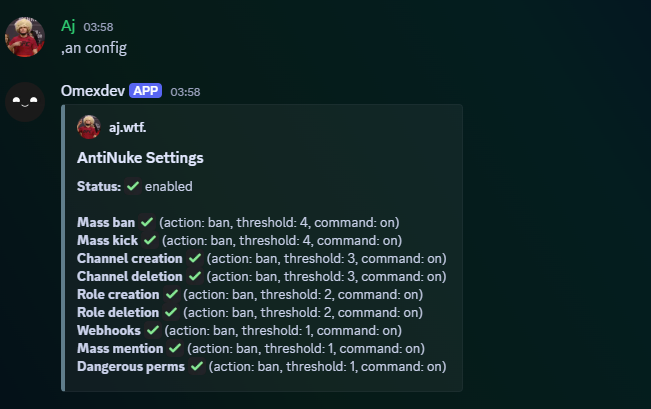
## Viewing configuration
Shows AntiNuke enabled status + each module state and parameters.
```javascript Syntax theme={null}
.antinuke configuration
```
```javascript Example theme={null}
.antinuke configuration
```
 ***
## Troubleshooting
### Nothing triggers
* Ensure the bot has **View Audit Log**
* Ensure AntiNuke is enabled: `.antinuke configuration`
* Ensure the specific module is enabled (shows ✅)
* Ensure the bot’s role is high enough to punish/remove roles
* Check your log channel is set properly
### stripstaff doesn’t work
* Bot must have **Manage Roles**
* Bot’s highest role must be **above** the roles it is attempting to remove
### mentions module doesn’t work
* Ensure **Message Content** intent is enabled
* Ensure the bot can read messages in the channels
* Ensure the module is enabled: `.antinuke mentions on ...`
***
## Dangerous permissions tracked in code
These permission keys are treated as “dangerous”:
| Dangerous Permission Keys |
| ------------------------- |
| `administrator` |
| `manage_guild` |
| `manage_roles` |
| `manage_channels` |
| `manage_webhooks` |
| `ban_members` |
| `kick_members` |
| `mention_everyone` |
| `moderate_members` |
| `manage_nicknames` |
***
## Troubleshooting
### Nothing triggers
* Ensure the bot has **View Audit Log**
* Ensure AntiNuke is enabled: `.antinuke configuration`
* Ensure the specific module is enabled (shows ✅)
* Ensure the bot’s role is high enough to punish/remove roles
* Check your log channel is set properly
### stripstaff doesn’t work
* Bot must have **Manage Roles**
* Bot’s highest role must be **above** the roles it is attempting to remove
### mentions module doesn’t work
* Ensure **Message Content** intent is enabled
* Ensure the bot can read messages in the channels
* Ensure the module is enabled: `.antinuke mentions on ...`
***
## Dangerous permissions tracked in code
These permission keys are treated as “dangerous”:
| Dangerous Permission Keys |
| ------------------------- |
| `administrator` |
| `manage_guild` |
| `manage_roles` |
| `manage_channels` |
| `manage_webhooks` |
| `ban_members` |
| `kick_members` |
| `mention_everyone` |
| `moderate_members` |
| `manage_nicknames` |